
Contributors:
Kevin Desousa, Adam Bradley, Nathalie Henry Riche, Ken Hinckley, Christopher Collins
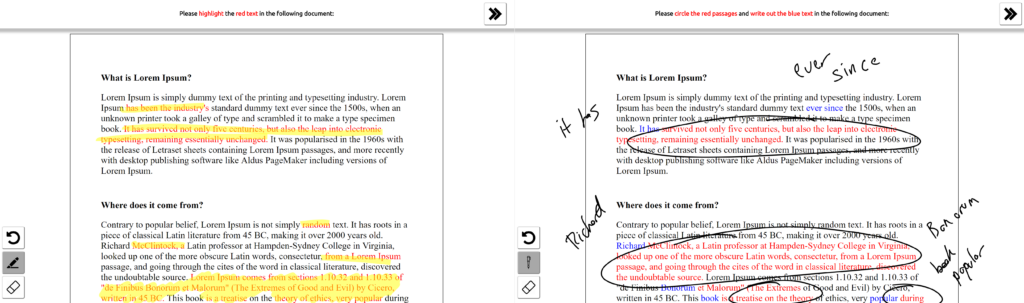
Annotating a document with a digital pen should feel as fluid as marking up paper. In most apps it doesn’t: every time you want to switch from highlighting to underlining to writing a note, you have to stop, reach for a small button on a toolbar, and come back. Those round trips add up, and when you forget to switch, or tap the wrong button, you end up with a highlight where you wanted ink.
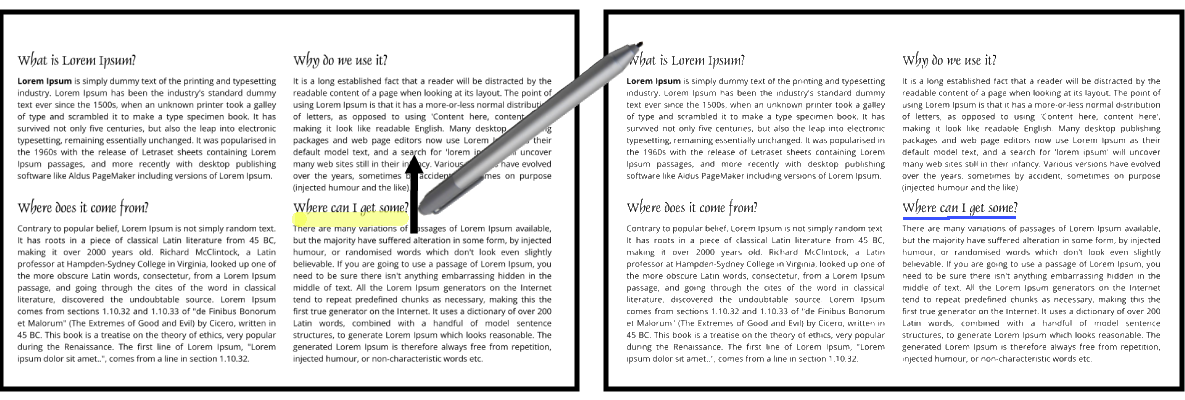
Magic Pen removes the toolbar from the loop. It watches how you move the pen and automatically switches between draw, highlight, and underline modes, so you can simply annotate.
How It Works
Magic Pen is driven by a machine learning model that recognizes what kind of mark you are making while you make it:
- Reading the stroke: As the pen moves, Magic Pen looks at short windows of pen data: movement, pressure, changes in pressure, and where the stroke sits relative to the text underneath it.
- Predicting the mode: An LSTM neural network, trained on more than 11,000 strokes, classifies each window as drawing, highlighting, or underlining. Once the prediction is consistent, the stroke switches to that mode on the fly.
- Fixing mistakes quickly: If Magic Pen guesses wrong, a quick flick of the pen’s eraser changes the stroke to the right mode, and a tap removes the most recent stroke, which is briefly outlined so you can see what will be removed.
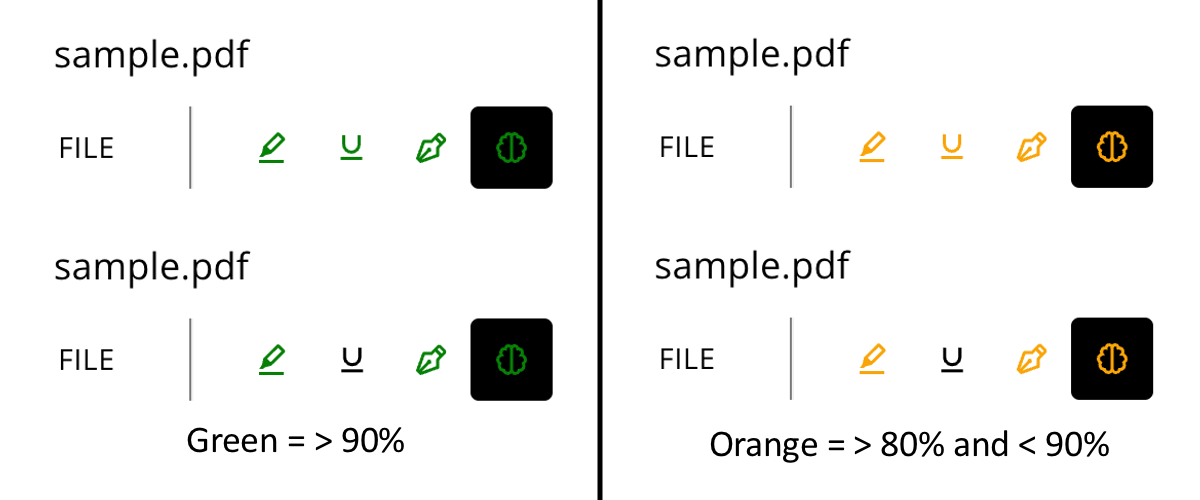
- Learning your style: Using transfer learning, Magic Pen tunes its model to the way you annotate, and the mode button on the toolbar changes colour to show how well the model currently fits you.
What We Found
We collected pen data from 27 participants across two studies, compared Magic Pen with a rule-based technique and a conventional menu in a study with 18 participants, and then ran a two-week deployment study with 8 participants using a refined version of the system:
- People preferred automatic switching: Most participants preferred an automatic technique over the conventional menu, and in the deployment study Magic Pen was preferred to a menu-based approach.
- More natural annotation: Without a toolbar in the way, people switched freely between highlighting, underlining, and writing notes, interleaving modes far more often than with the menu.
- Personalization helps: Transfer learning improved accuracy for individual users and made the model more predictable and stable over time.
- Accuracy isn’t everything: Whether people liked Magic Pen depended on more than raw accuracy: how predictable it felt and how frustrating its errors were mattered too.
Looking Ahead
Magic Pen shows that a pen can understand what you mean to do without asking you to tell it. We see future versions drawing on more signals, such as pen hover and eye gaze, continuing to learn as people use them, and explaining their decisions so that automatic behaviour stays easy to trust and correct.
Explore Magic Pen
Read our paper on arXiv: https://arxiv.org/abs/2610.11255
Download the PDF: Magic Pen: Automatic Pen Mode Switching for Document Annotation (PDF)
Read our blog post: Beyond Menu Hopping: How “Magic Pen” Automatically Detects Your Pen Mode
Video Presentation
Publications
-

Desousa, K., Bradley, A., Riche, N. H., Hinckley, K., & Collins, C. (2026). Magic Pen: Automatic pen mode switching for document annotation. arXiv preprint arXiv:2610.11255. https://doi.org/10.48550/arXiv.2610.11255
@misc{desousa2026magicpen,
title={Magic Pen: Automatic Pen Mode Switching for Document Annotation},
author={Desousa, Kevin and Bradley, Adam and Riche, Nathalie Henry and Hinckley, Ken and Collins, Christopher},
year={2026},
eprint={2610.11255},
archivePrefix={arXiv},
primaryClass={cs.HC},
doi={10.48550/arXiv.2610.11255},
url={https://arxiv.org/abs/2610.11255}
}